Guide
The Best AI Productivity Tools in 2026 (and How to Choose)
A category-by-category look at the best AI productivity tools available in 2026, with honest guidance on which tools actually fit which workflows.

The best AI productivity tools in 2026 depend on your workflow. For writing and reasoning, Claude and ChatGPT lead. For automation, Zapier AI and Make are mature. For notes, NotebookLM and Notion AI are worth a look. No single tool covers everything well.
A list of AI productivity tools from early 2025 reads like a museum exhibit. The category lines have moved: what started as a narrow coding sidekick is now a general-purpose reasoning engine, and what was once a single chat window now covers file analysis, browser agents, and team workspaces. The field has also fragmented in ways the early “AI is coming for your job” coverage did not predict. There is no single tool that covers everything well. Pick the right one for the job, or pick two.
Prices and model names change frequently. Where figures appear below, they reflect conditions as of mid 2026. Always verify against the vendor’s current plan page before subscribing.
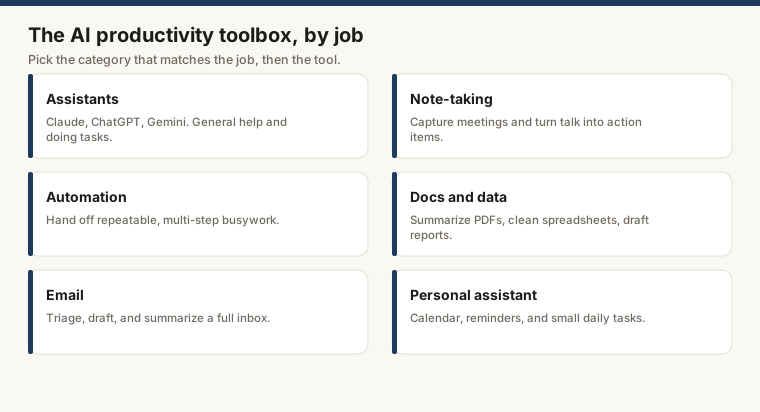
General-Purpose Assistants
This is where most people start, and for good reason. General-purpose assistants handle writing, research, summarization, code, and analysis in a single interface. The two options most people land on are ChatGPT (OpenAI) and Claude (Anthropic). A full side-by-side is in Claude vs ChatGPT, but the short version: ChatGPT has a wider feature surface, including image generation; Claude tends to produce cleaner, more consistent long-form writing and handles large documents without the context-window anxiety that used to be a constant complaint. Google’s Gemini is competitive, particularly for users already in Google Workspace.
Microsoft Copilot is built into Windows and Microsoft 365. For organizations already in that ecosystem, it requires zero new habits. It draws on the same underlying OpenAI models and integrates directly with Word, Excel, and Teams.
Who should pay for a premium tier?
Anyone whose work involves more than a few prompts per day. Context limits on free tiers are tight enough to be genuinely disruptive for document-heavy work. The breakdown at Claude pricing shows what each tier actually unlocks, which is more useful than the marketing language on the plan pages.
Note-Taking and Knowledge Management
AI note-taking has become its own product category, spanning from lightweight capture tools to full research environments. The best AI note-taking apps article covers this in depth. Here are the ones worth knowing.
NotebookLM (Google) grounds its responses in your own material rather than general training data. You upload documents, PDFs, or links, and the model works from those sources. It is particularly good for researchers and students, or anyone whose job involves synthesizing a reading list that no reasonable person would actually want to read in full. Free tier is generous as of mid 2026.
Notion AI extends Notion’s existing workspace with writing assistance, summarization, and database queries. If your team already lives in Notion, the add-on cost is easy to justify. If you are not a Notion user, the learning curve is real enough to matter.
Mem captures notes and surfaces connections over time without requiring any manual organization. Good for people who are allergic to folder structures but still want to find things later.
Automation
Automation tools are where AI moves from conversation to action. Instead of asking a model a question, you configure it to monitor inputs and trigger outputs across your other apps.
Zapier has added AI-native features on top of its existing automation engine: describe a workflow in plain English and it generates the steps. For non-technical users, this is a meaningful change from building zaps manually by trial and error. The full guide to how to automate tasks with AI walks through the practical setup.
Make (formerly Integromat) offers more complex logic and branching than Zapier at a lower price per operation. The interface takes longer to learn, which is a real cost. It suits teams with technical staff who want granular control without paying Zapier’s per-task pricing at volume.
n8n is open-source and self-hostable, which matters for teams with data residency requirements or a principled distrust of third-party pipelines running through their data. The AI nodes are actively developed as of mid 2026. There is a hosted version for teams that want the benefits without managing the infrastructure.
Docs and Data
Claude with file uploads handles long documents, spreadsheets, and codebases in ways that general chat interfaces often cannot. Upload a 200-page PDF and ask questions that require synthesizing across the full document; the answers hold up because the context window is large enough to hold the whole thing. The Claude Cowork environment, described in What Is Claude Cowork, extends this into a multi-file workspace where an agent can work across several documents in sequence rather than one at a time.
ChatGPT with Code Interpreter (part of the Plus plan) does something Claude currently cannot: run Python against your uploaded data. Hand it a CSV, ask it to clean the data and produce a chart, and it executes the code in-session. Not a replacement for a real analyst on complex problems, but it handles exploratory work and quick summaries well enough that “just upload it to ChatGPT” has become a reflexive first step for a lot of people.
Google Gemini in Sheets and Docs lets you query data in natural language and generate drafts directly in the document. For teams already in Google Workspace, the integration requires no new tool to learn.
Email AI has moved from autocomplete to tools that can draft, categorize, and, with some care, reply on your behalf.
Superhuman has had AI features for longer than most competitors and bakes summarization and reply drafting into a fast keyboard-driven interface. It costs more than standard email clients. Users who process high volumes consistently report the time savings justify it; users who send twenty emails a day usually find the price hard to defend.
SaneBox focuses on triage rather than drafting: it learns which senders matter and routes everything else out of the inbox. No AI writing, but it addresses the part of the email problem that drafting tools completely ignore.
Gmail’s built-in AI (part of Google Workspace) includes Smart Reply, Smart Compose, and summarization for long threads. The quality has improved enough that for casual users, a dedicated email AI tool may not be necessary. That is a lower bar than it sounds.
Personal Assistants
The best AI personal assistants article covers this category in detail. The distinction worth drawing here is between tools that integrate with your calendar and communications versus tools that are general reasoning engines used for personal tasks.
Claude and ChatGPT both fill the “personal assistant” role in the broad sense, handling planning, research, and decision support. Neither connects to your calendar out of the box, but both have integrations available through Zapier and similar tools. Whether “integrations available” equals “set up in under an hour” depends on your patience and your Zapier tier.
Reclaim and Motion are purpose-built for calendar optimization: they schedule tasks and meetings around your priorities automatically and re-plan when things shift. Narrow tools. Very good at what they do.
How to Actually Choose
Most professionals will end up with two or three tools rather than one. A general-purpose assistant (Claude or ChatGPT) covers the majority of writing and analysis. An automation layer (Zapier or Make) handles recurring workflows. A note-taking tool (NotebookLM or Notion AI) manages knowledge.
Run your actual work through the free tier for a week before subscribing to anything. The gap between a tool’s marketing and its behavior on your specific tasks is usually the most useful data point you will collect.
| Category | Representative tools | Free tier? |
|---|---|---|
| General assistant | Claude, ChatGPT, Gemini | Yes (limited) |
| Note-taking | NotebookLM, Notion AI, Mem | Yes / add-on |
| Automation | Zapier, Make, n8n | Yes (limited) |
| Docs and data | Claude, ChatGPT Code Interpreter | Yes (limited) |
| Superhuman, SaneBox, Gmail AI | No / Yes / Yes | |
| Personal assistant | Reclaim, Motion, Claude | Yes / Yes / Yes |
For alternatives to the two most-used assistants, the best ChatGPT alternatives is a useful next stop. For a direct comparison of the top two: Claude vs ChatGPT.
Frequently asked questions
What are the big 5 AI tools?
As of mid 2026, the tools most commonly grouped as the leading five are ChatGPT (OpenAI), Claude (Anthropic), Gemini (Google), Copilot (Microsoft), and Perplexity. Each targets a slightly different use case: ChatGPT and Claude are general-purpose assistants and workhorses for text, code, and analysis; Gemini integrates tightly with Google Workspace; Copilot is woven into Microsoft 365; and Perplexity is built around cited web search. Pricing and capabilities shift often, so check each vendor's current plan page before committing.
What are the 5 most popular AI tools?
By active user counts reported through early 2026, ChatGPT, Gemini, Copilot, Claude, and Canva AI rank consistently near the top. ChatGPT still holds the largest user base, but Claude has grown quickly, particularly among knowledge workers and developers who prioritize long-context accuracy. Canva AI skews toward design and marketing users. Popularity is not always a reliable signal of fit for a specific workflow, so matching the tool to the task matters more than following the crowd.
How do I choose the right AI productivity tool?
Start with the kind of work you actually do most. If you write a lot, test the writing quality of two or three assistants on your real content before subscribing. If you need to work with uploaded files (spreadsheets, PDFs, codebases), check whether the tool can handle files in the free tier or only behind a paywall. Automation-heavy workflows point toward dedicated tools like Zapier AI or Make rather than chat interfaces. Budget also matters: free tiers vary widely in context length, file handling, and model quality as of mid 2026.
Is it worth paying for an AI productivity tool?
For most professionals who use AI more than a few hours a week, yes. Free tiers on ChatGPT and Claude are genuinely useful, but they limit context window size, file uploads, and access to the best models. A paid plan at around $20 per month typically unlocks the full model, longer context, and priority access during peak hours. The math tends to work out if AI saves you two or three hours a week at your billing rate.