Guide
The Best AI Note-Taking Apps in 2026
A practical comparison of the best AI note-taking apps in 2026, including Otter, Fireflies, Granola, Notion AI, and Fathom, on accuracy, privacy, and price.

The best AI note-taking apps in 2026 are Otter.ai for general transcription, Fathom for clean Zoom summaries, Fireflies for integrations, Granola for local Mac recording, and Notion AI for teams already in Notion. Fathom has the most capable free tier.
Every meeting platform offers one-click recording. The recording then sits in a folder, unread, until you delete it to free up space. The AI note-taking apps below are trying to solve the gap between “captured” and “useful,” and they have landed on meaningfully different approaches.
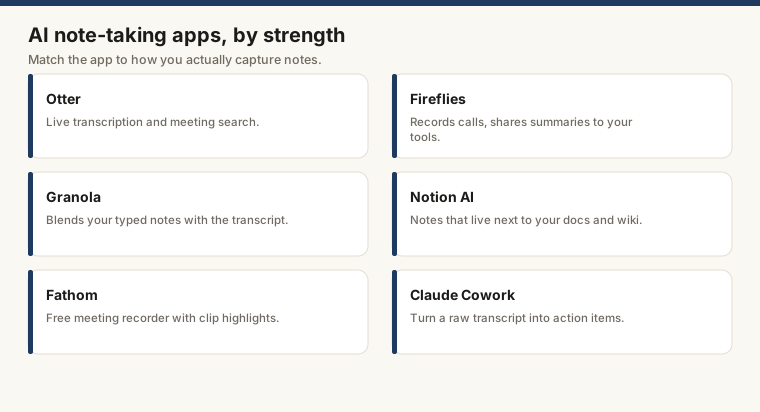
What these apps actually do
The base function is transcription: audio in, text out. Every app here does that. The part worth comparing is what happens next: speaker identification, summary structure, action item extraction, and whether the output lands automatically in the places your team actually tracks work (Slack, Notion, HubSpot, Jira).
The comparison covers five options on five dimensions: transcription accuracy, meeting summaries, integrations, free tier, and privacy. Pricing is as of mid 2026; check each vendor’s current page before buying.
Otter.ai
Otter.ai is the category elder. It joins Zoom, Google Meet, and Teams as a bot, and it also transcribes phone audio or uploaded files if you prefer not to have a robot sitting in your meeting making people nervous.
Transcription accuracy is solid for clear English audio. Speaker identification works after a brief calibration period, or you can assign names manually. Summaries are structured. The action item list occasionally runs long; Otter flags things as “actionable” with an optimism that not every participant will share.
The free plan is where it ages: 300 minutes per month and a 30-minute session cap. That is tight for anyone with more than a handful of calls per week, or anyone who schedules 90-minute workshops and forgets about the cap at minute 31.
Integrations include Slack, Salesforce, HubSpot, and Dropbox. Enterprise adds SSO, admin controls, and a data processing agreement for teams whose legal department reads the fine print.
Free tier: 300 minutes/month, 30-minute session cap. Paid plans start at $16.99/month (Pro) as of mid 2026. Check Otter’s pricing page for current rates.
Fathom
Fathom is the unusual one: actually free. Its free plan covers unlimited recordings and AI summaries for Zoom, Google Meet, and Teams, with no recording cap. In a category where “free” usually means “free until you try to use it,” this is worth noting.
The summary output is structured and clean: overall summary, key topics, action items, full transcript with speaker labels. It requires less editing than Otter’s equivalent, which matters if you are going to use these notes for anything more than reassuring yourself the meeting happened.
CRM and project tool integrations are not on the free plan; those land on the Team tier ($19/user/month as of mid 2026). If you just want the transcript and summary without further automation, the free version does the job.
Audio is processed in the cloud. Privacy policy at fathom.video/privacy. Enterprise tier adds a DPA.
Good for: individuals who want unlimited free transcription, Zoom-heavy teams.
Fireflies.ai
Fireflies.ai is where you go when the transcript needs to go somewhere automatically. It connects to HubSpot, Salesforce, Notion, Slack, Zapier, Asana, and a long list of others. If a meeting produces notes that should flow into your CRM or project tracker without a human copying them over, Fireflies is the tool most likely to have that pipe already built.
The summary and action item extraction are competent. The search function, which lets you query across all indexed transcripts by keyword or topic, gets genuinely useful once you have a few months of meetings in there.
The free plan is limited to three months of storage with no integrations. Pro is $18/seat/month as of mid 2026, which is where the integrations and full summary features live.
Good for: sales teams logging calls to a CRM, teams that want meeting notes in Notion or Slack without touching them.
Granola
Granola does not join your call. It is a Mac app that records system audio locally, invisibly, without appearing in the attendee list or announcing itself with a bot notification. The audio stays on your machine until you send it for transcription.
That is the tradeoff: Mac-only, fewer integrations than Fireflies. But for legal, HR, or financial discussions where a visible “Recording Bot has joined” message would change the room, local-first recording is not a nice-to-have. It is the whole point.
Summaries are fast and clean. You can take your own notes during the call; Granola merges them with the AI summary afterward, which sounds like it might produce a mess and generally does not.
Pricing as of mid 2026: free for limited use, paid plan for unlimited meetings. Check granola.so for current rates, which have moved around as they grow.
Good for: Mac users with privacy requirements, executives or lawyers who cannot have a bot visibly join calls.
Notion AI
Notion AI is not a transcription tool. This matters. It is an AI layer inside Notion that processes text already in your workspace: summarizing, rewriting, extracting action items, generating content from notes that exist.
The use case: your team takes meeting notes in Notion, manually or by pasting from a transcription tool. Notion AI turns those notes into a structured summary or action list in a few seconds. It does not capture audio. It reads what you already typed.
For teams that live in Notion, adding Notion AI ($10/member/month, bundled with the Plus plan) is less friction than onboarding a separate tool. For teams not in Notion, there is nothing here that would justify starting now just for this feature.
Good for: teams already in Notion who want to turn raw notes into something structured without switching apps.
Using Claude for meeting transcripts
A useful pattern that often gets skipped: paste a raw transcript from any of the above tools (or copied out of Zoom, Teams, or Google Meet directly) into Claude, then ask it to extract action items by owner, summarize by speaker, or draft a follow-up email. Claude handles long transcripts well because of its context window, and you have more control over the output format than most native summary features allow.
This is not a substitute for an integrated tool when you need things to run automatically. For a one-off, or a meeting that a dedicated tool mangled, it is worth knowing. The workflow for turning meeting notes into action items covers how to structure the prompt for consistent results.
For more on what Claude handles in a productivity context, see the guide to AI personal assistants.
Comparison table
| App | Best for | Local recording | Free tier | Paid (approx.) |
|---|---|---|---|---|
| Otter.ai | General transcription | No | 300 min/mo | From $17/mo |
| Fathom | Free unlimited summaries | No | Unlimited recordings | $19/user/mo (Team) |
| Fireflies.ai | CRM and tool integrations | No | Limited | From $18/seat/mo |
| Granola | Privacy-sensitive meetings (Mac) | Yes | Limited | Paid plan |
| Notion AI | Teams already in Notion | No | No (add-on) | $10/member/mo |
Choosing between them
If you want to spend nothing and get reliable summaries: Fathom.
If your team tracks calls in Salesforce or HubSpot: Fireflies.
If you cannot have a bot join your calls: Granola (Mac only).
If your team already runs in Notion: Notion AI.
For occasional use or processing transcripts from another tool: paste them into Claude.
The AI personal assistants guide covers what to do with these notes once you have them.
Frequently asked questions
What is the best free AI note-taking app?
Fathom is the strongest free option for meeting transcription. Its free plan includes unlimited recordings and summaries for Zoom, Google Meet, and Microsoft Teams. Otter.ai's free plan covers 300 minutes per month, which is enough for light use.
How accurate are AI transcription apps?
Accuracy for clear audio with one or two speakers is generally very high across the leading apps, typically cited in the 90-95% range for English. Accuracy drops with accents, crosstalk, technical jargon, and poor audio quality. All of the apps covered here allow you to edit transcripts manually.
Are AI note-taking apps private?
Most cloud-based apps process your audio on their servers, which means meeting content leaves your device. Granola processes audio locally on Mac, which avoids that. For sensitive meetings, check each vendor's data processing agreement and whether they use your data to train models. Otter, Fireflies, and Fathom all publish privacy policies and offer enterprise tiers with stronger data controls.