Guide
The Best AI Personal Assistants in 2026
The top AI personal assistants of 2026 compared: what each one can actually do for you, how they connect to your tools, and what they cost.

The best AI personal assistants in 2026 are Claude Cowork, ChatGPT, Gemini, Microsoft Copilot, and Motion. The right pick depends on your tools and what you want the AI to do: chat and draft, or actually complete tasks on your behalf.
The phrase “AI assistant” used to mean a voice widget that set a timer. In 2026 it means something closer to a junior colleague who can read your files, draft your emails, schedule your week, and build small tools without you writing a line of code. That “junior colleague” framing is the useful one, because it implies a question worth asking before you pick: is this person going to do the work, or just tell me how to do it myself?
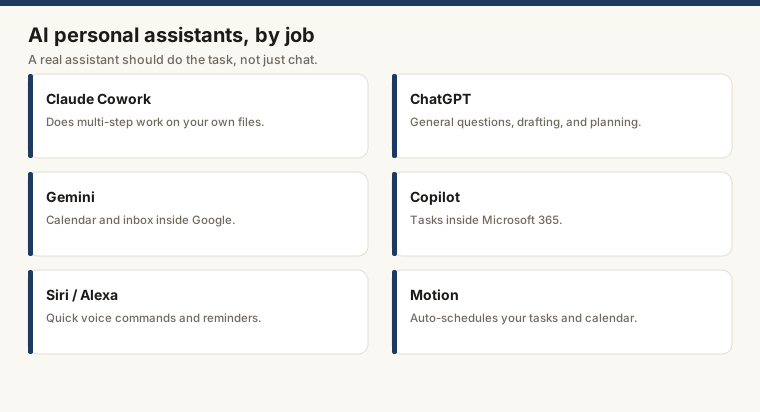
This guide covers six options in honest terms: what each one can actually complete for you, where it stops short, what it costs, and who it suits. Prices are as of June 2026; check each vendor’s pricing page before buying.
What separates a real assistant from a chatbot
A chatbot answers questions. An assistant takes actions. The practical test is blunt: can it open a file from your computer, work through it, and return a finished result? Can it book a meeting without you copying the output into a second app by hand?
Most products still sit closer to the chatbot end. They produce excellent text, then hand execution back to you. That is not a criticism; it is a fact you want to know before you commit.
Claude Cowork
Best for: people who want multi-step work done on their actual files
Claude Cowork is Anthropic’s agentic layer on top of Claude. The standard Claude.ai interface is a conversation; Cowork connects to your local filesystem, browser, and apps, then works through multi-step tasks without you shepherding each one.
A practical example: paste in a folder of customer emails, tell Cowork to categorize them by topic, draft a reply template for each category, and save the results as separate files. It does that. You check the output. You do not copy-paste each reply by hand.
For content work, research, and document-heavy workflows it is the strongest option at this capability level. What Is Claude Cowork covers the specific task types it handles well.
Integrations: filesystem, browser, GitHub, and a growing set of MCP (Model Context Protocol) connectors for Slack, Notion, Linear, and others.
Price: included in Claude Pro ($20/month) and Claude for Teams ($25/user/month). Enterprise pricing available.
Limitations: works best on clear, bounded tasks. “Manage my life” produces worse results than “do this specific thing to these files.”
ChatGPT (OpenAI)
Best for: general drafting, code help, and broad task coverage with the widest plugin ecosystem
ChatGPT is the product most people tried first. The GPT-4o model handles text, images, voice, and code. The paid tier adds memory across conversations and access to GPT-4o with extended thinking for harder problems.
The plugin system means ChatGPT can connect to hundreds of external services, though the quality of those integrations varies considerably. Native productivity-tool integrations are thinner than Gemini’s or Copilot’s. You can generate a draft email in ChatGPT. Getting it into your inbox still requires you to move it.
OpenAI’s Canvas feature, which lets you edit documents collaboratively with the model, is worth knowing about if you spend time in long drafts. It overlaps with Claude Artifacts in concept.
Integrations: browsing, code interpreter (Python sandbox), image generation (DALL-E), third-party plugins, and API for custom builds.
Price: free (GPT-4o with limits); Plus $20/month; Team $30/user/month; Enterprise custom.
Limitations: memory and context can drift on long projects. No native calendar or inbox access without a plugin.
Gemini (Google)
Best for: users deep in the Google ecosystem who want the assistant wired into what they already use
Gemini’s advantage is integration that actually works without setup. It reads Gmail, checks Calendar, adds events, drafts replies, and summarizes threads. If your work lives in Google Workspace, that removes a class of manual steps that the other products still require you to handle.
Gemini Advanced (the paid tier) adds longer context, stronger reasoning, and the ability to work with Google Drive files. The 2025 “Gems” feature lets you create specialized versions of Gemini trained on your own documents.
The model trails Claude and GPT-4o on nuanced writing tasks in most independent benchmarks. For calendar management and inbox triage on Google infrastructure, it is the lowest-friction option available.
Integrations: Gmail, Google Calendar, Google Drive, Google Docs, Sheets, Meet, and third-party apps via Google Workspace extensions.
Price: free (Gemini 2.0 Flash with limits); Google One AI Premium $19.99/month; Workspace add-on pricing varies.
Limitations: integration quality is strongest inside Google’s own products. Third-party connections require more setup.
Microsoft Copilot
Best for: organizations already running Microsoft 365
Copilot is Microsoft’s AI layer stitched into Word, Excel, Outlook, Teams, and PowerPoint. If your organization runs Microsoft 365, Copilot can summarize a Teams meeting you missed, draft a Word report from a bullet list, pull data from Excel and write narrative around it, and reply to Outlook threads with context from the thread itself.
The appeal is tight integration with tools IT has already mandated. The catch is that Copilot requires a Microsoft 365 subscription underneath it, which makes it impractical for anyone not already in that ecosystem.
Copilot Studio, the enterprise build-your-own layer, lets organizations create custom agents connected to internal data. That is where the product gets genuinely useful for large teams with specific workflows.
Integrations: all Microsoft 365 apps, SharePoint, Teams, and Copilot Studio for custom enterprise agents.
Price: Microsoft 365 Copilot $30/user/month on top of existing Microsoft 365 license. A Copilot free tier is available at copilot.microsoft.com with basic features.
Limitations: tied to the Microsoft ecosystem. Consumer-tier features are narrower than the enterprise product.
Siri and Alexa
Best for: quick voice queries and smart home control
Siri and Alexa are the oldest names on this list and the most limited for knowledge work. Timers, music, smart home controls, quick lookups, reminders: they handle those well. Complex task execution is not the category they play in.
Apple Intelligence, rolled out in iOS 18 and macOS Sequoia, improved Siri’s ability to take actions inside apps (scheduling a text to send later, summarizing a notification stack). It is device-centric, not knowledge-work-centric. The capability ceiling is different.
Alexa’s 2025 “Alexa Plus” update added more conversational depth, but document work and multi-step research tasks remain outside its scope.
Price: Siri is free with Apple devices; Alexa is free with Amazon devices; Alexa Plus subscription pricing applies for advanced features.
Motion
Best for: autonomous scheduling and task prioritization
Motion is not a general assistant. It does one thing: schedule your tasks and calendar automatically, based on deadlines, priorities, and your working hours.
Add a task with a deadline and an estimated duration. Motion slots it into your calendar around existing meetings, respects focus blocks, and re-plans when something runs over or a new meeting lands. For knowledge workers with dense task lists and fragmented calendars, this removes the weekly planning overhead that most AI chatbots can only advise you about.
Price: Individual $19/month; Team $12/user/month (annual).
Limitations: scheduling only. No drafting, no research, nothing outside the calendar.
Side-by-side comparison
| Product | Can it do file work? | Native calendar? | Native inbox? | Starting price |
|---|---|---|---|---|
| Claude Cowork | Yes | No (via MCP) | No (via MCP) | $20/month |
| ChatGPT Plus | Limited (sandbox) | No | No | $20/month |
| Gemini Advanced | Yes (Drive) | Yes | Yes (Gmail) | $19.99/month |
| Copilot (M365) | Yes (Office) | Yes (Outlook) | Yes (Outlook) | $30/user/month |
| Siri / Alexa | No | Limited | No | Free |
| Motion | No | Yes (scheduling) | No | $19/month |
How to pick
Start with where your work actually lives. Google Workspace users: Gemini removes the most friction. Microsoft 365 organizations paying for Copilot: that is the default, use it. Need an AI that processes files, builds outputs, and works through multi-step research without you supervising each step: Claude Cowork is the current front-runner on that capability.
ChatGPT is the best catch-all if you are not locked into an ecosystem and want broad coverage across code, images, and a large plugin market.
Motion is worth adding on top of whichever general assistant you choose if calendar chaos is the specific problem, not a general one.
Free tiers are enough for occasional use on all the general-purpose products. Persistent memory, longer context, and actual task execution require paying.
Where to go next
See What Are Claude Artifacts for a practical look at how Claude builds documents, charts, and small tools in a side panel you can edit and download.
Frequently asked questions
Can an AI assistant manage my calendar?
Yes, with the right tool. Gemini connects directly to Google Calendar and can schedule, reschedule, and summarize your day. Motion auto-schedules tasks by priority. Most others, including ChatGPT and Claude, need a third-party integration like Zapier to touch your calendar.
Is an AI personal assistant private?
It depends on the product and your plan. Enterprise tiers of Claude, ChatGPT, and Copilot all offer data isolation where your inputs are not used to train models. Free consumer tiers typically use your conversations for improvement. Read the privacy policy for the specific tier you use.
What are the best free AI personal assistant options?
Claude.ai (free tier), ChatGPT (free tier with GPT-4o), and Gemini (free with a Google account) are the strongest no-cost options. Motion and Copilot require paid subscriptions for meaningful use.