Guide
What Are Claude Artifacts (and How to Use Them)?
Claude Artifacts are standalone, editable outputs in a side panel: documents, code, diagrams, and small interactive apps you can publish and reuse.

Claude Artifacts are standalone outputs Claude builds in a side panel beside the chat: documents, code, diagrams, SVG images, and small interactive web apps. You edit them by asking, or edit Markdown in place, step through versions, then copy, download, or publish. Artifacts are available on the free Claude plan.
Most AI chat sits in one long thread. You ask, the model answers inline, and you copy the useful part somewhere else. The copy step is where good work gets lost: a draft buried in a scroll, pasted into the wrong doc, or gone when you close the tab. Claude Artifacts exist to fix that one problem.
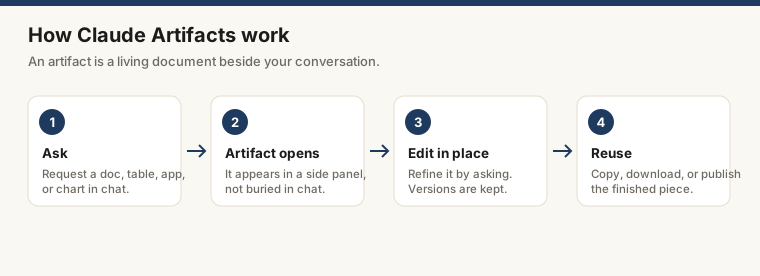
An artifact is a standalone output Claude builds in a panel beside the conversation instead of inside it. The panel stays open while you keep talking. You ask for changes and the artifact updates. When it is ready you copy it, download it, or publish a link. The shift sounds small. For anything longer than a quick reply, it changes how the work feels.
This is the second guide in the Claude ecosystem path. The first piece, Claude Projects, covers how to keep context and files together across sessions, which is the natural home for artifacts you return to.
What triggers an artifact
Not every response becomes one. According to Anthropic’s help center, Claude creates an artifact when the content is significant and self-contained (typically more than about 15 lines), stands on its own without extra chat context, and is something you would likely edit, reuse, or refer back to later. Conversational replies stay in the thread.
The output types that become artifacts:
- Documents in Markdown or plain text
- Code snippets
- Single-page HTML sites
- SVG images
- Diagrams and flowcharts
- Interactive React components
The short version: if what you asked for would naturally live in a file, Claude builds it as an artifact.
How to create and edit them
Starting one
Ask for something that fits the categories above. “Write a one-page brief on X” or “build a simple tip calculator in HTML” is enough. Claude opens the side panel and starts building. You do not have to request an artifact by name; Claude decides when the output calls for one. You can also open the artifacts space from the sidebar to start from scratch or remix an existing one.
For content work, naming the format up front saves prompts later. “Write a structured report with an executive summary, three sections, and a table comparing the options” produces a more useful artifact than “write something about X.”
Iterating on it
Once the artifact exists, every follow-up can touch it. “Make the table sortable,” “add a pricing section,” “change the tone to be more direct” all update the artifact instead of producing a fresh reply in the thread. The artifact is the working document; the conversation is the instruction layer around it.
For Markdown documents there is a faster path. Highlight the text you want changed, click Edit with Claude, and type your request. Claude makes the edit right where you marked it, so you do not have to describe which section you mean. Your edits do not change Claude’s memory of the original content, so the model still understands the full piece.
Version history
Claude keeps a version at each step, and a version selector lets you switch between them. If a rewrite comes back worse (it happens), step back to the earlier version and try a different prompt. You can also edit a prior chat message to branch the conversation, which gives that branch its own set of artifacts. It is lightweight version control, not full undo and redo.
Export and publish
From the lower corner of the artifact window you can view the underlying code, copy the content to your clipboard, or download the file to use elsewhere. You can also publish an artifact, which generates a link anyone can open and interact with until you unpublish it. Per Anthropic’s publishing guide, publishing is free regardless of how many people use the shared artifact.
Interactive and AI-powered artifacts
A single-page HTML or React artifact runs right in the panel, so a tip calculator, a unit converter, or a small quiz works in the same session and downloads as a file you can open in any browser.
Some artifacts go further. Claude can build artifacts that call Claude through a text API, turning them into AI-powered apps: a coaching tool, a question answerer, a small game with adaptive responses. Anthropic describes the flow plainly: you describe what you want, Claude writes the code, the app runs on Anthropic’s infrastructure, and each user authenticates with their own Claude account. When you share one, others use it with no API keys and no cost to you, since usage counts against each person’s own subscription limits.
Two features extend what these apps can do, both gated to paid plans. MCP integration lets an artifact read from and write to tools like Asana, Google Calendar, and Slack through the Model Context Protocol, available on Pro, Max, Team, and Enterprise. If you are new to that protocol, what is MCP explains the plumbing. Persistent storage lets an artifact keep data across sessions, which is what makes a journal, tracker, or leaderboard possible. Anthropic lists a 20 MB per-artifact limit, text-only input, and a note that storage only works once the artifact is published.
What artifacts are not
They are not a freeform document editor. Outside the highlight-and-edit flow for Markdown, you drive changes through conversation rather than dragging text around or dropping in images. Treat an artifact as a structured output you shape by asking, then take elsewhere for final polish.
They are also not the same as the rest of the Claude ecosystem, and the differences matter for picking the right tool:
- Claude Projects keep files and context together across sessions. Artifacts you want to revisit belong there.
- Claude Skills teach Claude a repeatable procedure it can apply on demand, rather than producing a one-off output.
- Claude Connectors link Claude to outside services so it can pull in live data, which an artifact can then display.
The clearest contrast is with Cowork. Artifacts build new, self-contained things inside your Claude account; Cowork is the agentic product that reads and writes real files already on your computer. If your work starts from documents that exist on disk, that is a Cowork job. If you are generating something fresh, artifacts are the place. The two overlap less than they first appear.
Tips for better artifacts
Be specific about format before you start. Changing structure later costs extra prompts. “A two-column table with columns X and Y, ten rows, no header row” is faster than asking Claude to reflow a list after you see it.
Use the version selector. Plenty of people never notice it. When a revision goes sideways, step back to the prior version instead of asking Claude to undo in prose.
Lean on Edit with Claude for documents. For a long Markdown brief, highlighting the exact paragraph and asking for a change is quicker and more precise than describing the location in chat.
Publish only what you mean to share. A published artifact is open to anyone with the link, and if it uses shared storage, the data others enter is visible to all users. Check the storage type before putting anything sensitive into one.
Download or save before you move on. Artifacts live in your account, not on your computer, so keep a copy of anything you will need outside Claude.
Where this fits
Artifacts are the output layer of Claude: the place where a request turns into something you can edit, publish, and reuse. The next piece in this path, on Claude Skills, covers the input layer, teaching Claude procedures it can run again and again. You can also start the whole ecosystem path from the learn hub.
Frequently asked questions
What can you make with Claude Artifacts?
Documents in Markdown or plain text, code snippets, single-page HTML sites, SVG images, diagrams and flowcharts, and interactive React components. The rule of thumb: if the output is significant, self-contained, and something you would want to edit or reuse later, Claude puts it in an artifact rather than the chat thread.
Can you edit Claude Artifacts?
Yes. The artifact stays open while the conversation continues, so any follow-up request updates it. For Markdown documents you can also highlight text, click Edit with Claude, and type your change directly where you marked it. A version selector lets you step back to an earlier version if a revision goes wrong.
Are Claude Artifacts free?
Yes. Accessing artifacts and building Claude-powered artifacts are supported on the Free, Pro, Max, Team, and Enterprise plans. Some additions, such as MCP integration and persistent storage, require Pro, Max, Team, or Enterprise.
Do Artifacts save files to my computer?
No. Artifacts live in your Claude account and you copy or download them to use elsewhere. If you want Claude to read and write real files on your machine, that is Cowork, the agentic product covered in this series.